← Back to libraryGBCGPL-3.0-or-later
uCity · Play Free Online
AntonioND
uCity is a free GBC game you can play right in your browser — no download, no install, with save states, gamepad support and touch controls on mobile.
Play nowThe first launch downloads the emulator core — please wait a moment.
How to Play: Controls
Keyboard
| Game button | Keyboard key |
|---|
| D-Pad | ↑ ↓ ← → |
| A | Z |
| B | X |
| Start | Enter |
| Select | V |
These are the emulator's default bindings — remap them anytime in the emulator menu's control settings.
Gamepad
Plug in any USB or Bluetooth gamepad and play right away (Gamepad API) — no setup required.
Touch / Mobile
On phones and tablets a virtual gamepad (D-pad + A/B + Start/Select) appears automatically on the touchscreen.
The emulator menu also includes save states, fullscreen and fast-forward; your saves stay in this browser.
About
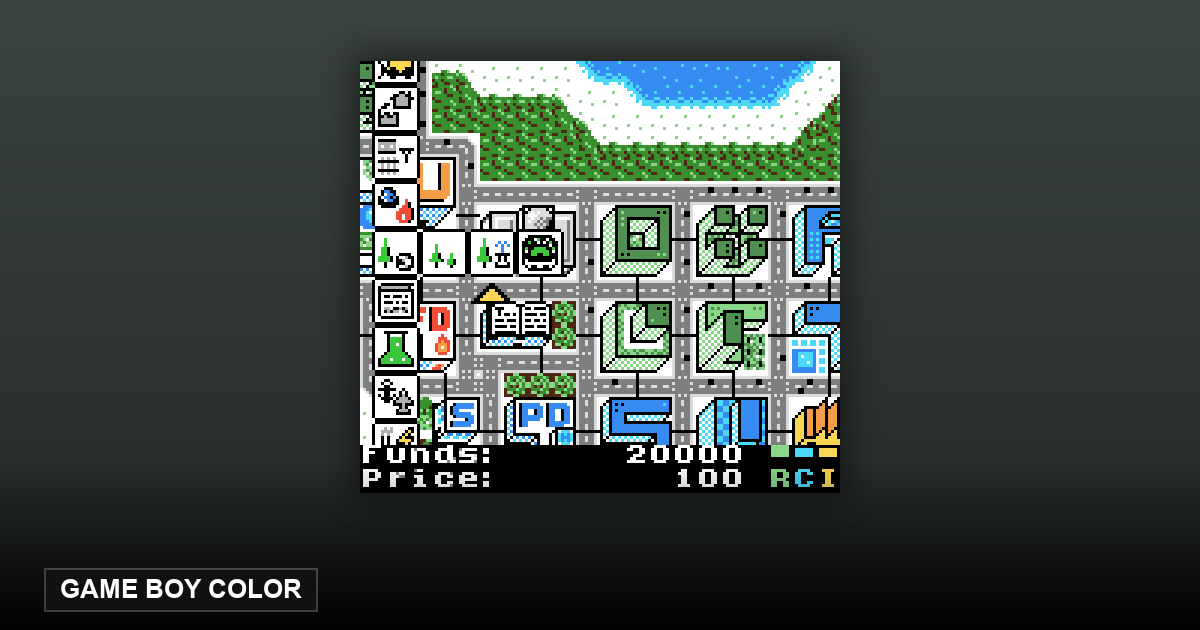
uCity is an open-source city-building game for the Game Boy Color by AntonioND, released under the GPL-3.0-or-later license with full source on GitHub. It is a genuine city simulator on a handheld cartridge: you plan residential, commercial and industrial districts, and the city develops on its own from there.
The SELECT button opens the build menu where you shape your city; residential, commercial and industrial zones then develop automatically, and a well-run settlement grows from a small village all the way to a capital. It is a pocket-sized take on the classic city-builder formula, squeezed within real Game Boy Color hardware limits.
Play uCity online free in your browser — the Game Boy Color core runs client-side, with save states, gamepad and touch support built in.
Source & project page ↗
What Is uCity? A Full City Builder on the Game Boy Color
City builders eat screens. The genre's whole pleasure — surveying a metropolis you grew from a crossroads — depends on real estate, which is why the genre migrated to monitors and never came back. That's exactly what makes uCity interesting: it's a full city-building simulation, with zoning, power grids, budgets, taxes, pollution, and population milestones, running on a screen 160 pixels wide. It doesn't feel like a novelty miniature of a city builder. It feels like the genre was always meant to be this portable, and everyone else just forgot.
That's the case for playing it today. uCity isn't a nostalgic artifact — it's a genuinely complete SimCity-lineage game you can carry in a pocket, boot in a browser tab, and lose an evening to. It's free, open source under GPL-3.0-or-later, and you can play it right now on this site. If you've ever wanted a city builder for a commute, this is one of maybe two that exist.
What the First Ten Minutes Are Like
You start with an empty grid and a small bank balance. The D-pad moves the cursor, and SELECT opens the build menu — that one button is the whole interface, and it works. The first moves are the classic ones: lay roads, zone residential and commercial and industrial blocks around them, then place a power plant and watch the little lights come on. The game's first lesson arrives immediately and never leaves: nothing grows without power, and power plants have consequences. Coal is cheap and dirty, solar only works in summer, wind only in winter, and the cleaner high-tech options — fission, fusion — only unlock once your city has grown a university.
The first real decision is where the industrial zones go relative to the housing, because pollution drifts and your citizens are not stupid. Ten minutes in, you have a village on screen, a positive budget line, and the exact feeling that got people hooked on this genre in 1989: the map is yours, and it's still mostly empty.
Where You'll Get Stuck
The difficulty curve is economic, not scripted. Your village becomes a town at 500 residents, a city at 1,000 — which demands a library — then a metropolis at 3,000 with stadium and university, and finally a capital at 6,000 with port and airport. Each milestone changes what the city needs, and the failure mode is always the same: the budget. Four consecutive negative-budget years and the game is over. Most players die not from a catastrophe but from over-building ahead of their tax base — a stadium for a city that couldn't afford one.
The event layer keeps you honest: fires happen, and if you built a nuclear plant, meltdowns are on the table, leaving permanent radiation. (There's an option to disable disasters, which the game offers without judgment — it knows its audience.) The wall most players hit is the middle game, where infrastructure maintenance creeps up faster than population, and you learn to do the unglamorous math that real mayors do.
uCity and the SimCity Lineage
The genre's famous entries were built for machines with room to sprawl. uCity's achievement isn't shrinking the idea — it's proving the idea was never about the screen size. The feedback loop that makes city builders work (zone, power, growth, budget, invest) survives the transition intact, and the small map arguably improves it: on a Game Boy Color grid, every tile is a real decision, not one of ten thousand. Compared to modern city builders with their layered systems and DLC trees, uCity is a scalpel: fewer systems, each one load-bearing. It's the version of the genre where you can actually hold the whole city in your head — which is, when you think about it, what the genre always pretended to offer.
Playing It Here
On this site, uCity runs in your browser with the emulator's default keyboard mapping: the D-pad is the arrow keys, A is Z, B is X, Start is Enter, and Select — the button that opens the build menu — is V. Plug in a USB or Bluetooth gamepad and it works immediately, no configuration. On a phone, a virtual D-pad and buttons appear on the touchscreen, and the game's cursor-driven interface suits touch surprisingly well, since you're never asked for reflexes, only decisions.
The emulator menu gives you save states: bookmark a healthy budget year before experimenting with a fission plant, and reload if the experiment glows in the dark. Saves live in your browser, so closing the tab is safe — but clearing browser data takes the city with it. The game itself supports sixteen saved cities on its own save slots, so you can run a clean, green utopia and a coal-choked dystopia side by side.
uCity lives in our Game Boy library alongside the rest of the homebrew collection — if a management game sounds good but you'd rather not balance a budget, the GBC's other standout, Dawn Will Come, trades spreadsheets for survival drama. And if pure puzzles are more your speed, 2048gb is the same platform's idea of a coffee-break game.
Where uCity Came From
uCity was created by AntonioND and is released under the GPL-3.0-or-later license, with source code on GitHub. It's written for the Game Boy Color specifically — the original Game Boy doesn't have the RAM for it — using the RGBDS assembly toolchain, which puts it in the tradition of hand-optimized games that squeeze real simulation out of an 8-bit CPU. It's one of the most technically respected projects in the GBC homebrew scene, and one of the very few complete city builders on any 8/16-bit handheld.
µCity Tips and Tricks
- Roads before zones: a zone without road access never develops, no matter how much power you give it.
- Keep a cash buffer before expanding — the fastest way to lose is four negative budgets in a row.
- Place schools early: education is the slowest system in the game and it gates your best power plants.
- Cluster services (police, fire, hospital) to cover several blocks from one spot instead of scattering them.
- When a fire breaks out, demolish a ring of tiles around it — burned tiles around the fire stop it spreading.
- Save before experimenting: with 16 save slots you can keep a 'known good' city and branch freely.
Frequently Asked Questions
Does this game need me to bring my own ROM?
No. Everything in this collection is open-source homebrew — uCity loads and plays instantly in your browser. The "bring your own ROM" feature elsewhere on this site is a separate thing, for people who already own commercial game files.
Why is it Game Boy Color only?
The game needs more working RAM than the original Game Boy has. The Color's extra memory is what makes a full simulation possible.
How many cities can I keep?
Sixteen, on the in-game save slots — plus the browser's save states on top.
Can I play it on my phone?
Yes — the browser version works on mobile, and the pace of a city builder suits a touchscreen well.
Is it really free?
Yes: GPL-3.0-or-later, source code public, no account, no ads. You can play it here on this site.