About
One minute per round: spot the hidden penguin, score for right answers, lose a point for wrong ones — the whole rule fits in one sentence.
A 2025 game-jam build on the circus and industrial themes; every model, texture and sound effect is the author’s own work, MIT licensed.
Source & project page ↗
How to play JamClown (Nintendo DS)
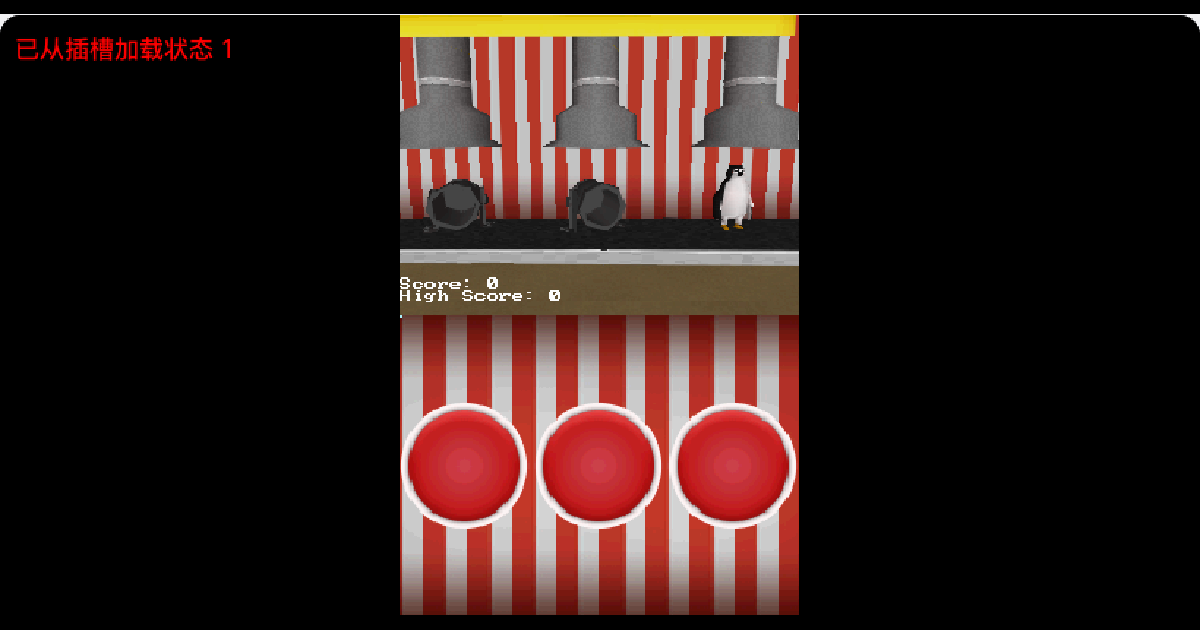
One rule: find the hidden penguin inside a derelict circus that has been converted into a cannon factory. Correct guesses score, wrong guesses cost a point, and you get 60 seconds — the result is your score. No levels, no story progression: a one-minute loop you replay.
You open on a 3D scene: rows of cannons stand in the yard and one of them holds the penguin. The premise is an old circus turned industrial, so the picture is machinery and shadow rather than a cartoon stage. Note that the game has no background music — that is not a loading failure. The author states in the README that sounds were left unfinished during the game jam and that what you hear is not how it was meant to sound.
The rhythm of the first 60 seconds: click or tap a cannon, get an immediate right/wrong answer, watch the score move, keep going. Because a wrong guess subtracts, clicking at random has negative expected value — looking carefully beats clicking fast.
Three concrete tips and traps
First, look before you click. That is the only real tip: accuracy outranks volume, since one mistake costs what two correct answers earn back. Second, watch the clock — people hesitate for twenty seconds and then panic-click the last twenty, losing the points they had. Third, do not reach for the d-pad: this is a pointer game and the d-pad is unbound. A mouse click on the canvas is a stylus tap on the DS touchscreen.
The usual place people get stuck is clicking and seeing nothing happen, which is almost always a click on the upper screen — only the lower DS screen is a touch surface, and the emulator stacks both into one canvas. The other is the missing audio, which is the author's unfinished sound work rather than a fault in our player.
Controls (including the keys this game does not use)
Touchscreen / mouse: the only real input — click a cannon to choose. Start: begin or restart. D-pad, A/B/X/Y and L/R: unbound here, pressing them does nothing and that is not a fault. One honest caveat: this scene animates on its own, so 'the screen changed after I pressed X' does not prove X works — multiple frames differed in my run regardless of input.
What JamClown is: a weekend DS game about finding a penguin
One sentence: a timed click-and-spot arcade micro-game — not a puzzle, not a platformer, a 60-second round of eyes, hands and restraint.
It was made by lorenzolanglois as his first NDS project, built in a weekend for a game jam whose themes were Circus and Industrial, written with libnds (devkitARM toolchain) and released under the MIT licence, with source and assets at lorenzolanglois/JamClown. The ROM we serve (409,600 bytes) is the author's own v1.0 release. The asset chain is unusually clean for homebrew: the README states that every 3D model, texture and sound effect is his own work, and the original obj and texture files are in the repository.
One concrete difference: it hides the target inside a 3D cannon array. Most spot-the-target micro-games paste targets onto a flat 2D field you can scan in one pass; here the target sits behind perspective, occlusion and lighting differences, so the same cannon does not look the same from every angle — misreading the scene is part of the design rather than a sign you are bad at it.
Who it suits: anyone who wants a minute in the browser and enjoys being one click away from right. It also works for children, since the rule fits in one sentence. Who it does not suit: players who want finished audio (the author says it is not), levels or progression, or a larger scope than a jam build — this page does not dress it up as more. There are three Nintendo DS games on the shelf right now, and this is the lightest of them.
Frequently Asked Questions
Why is there no sound or music?
The author documents it: sounds were left unfinished during the jam and are not how the game was meant to sound, and there is no background music. We did not modify the build.
Why does clicking do nothing?
Most likely the upper screen. Only the lower DS screen is a touch surface, and the emulator stacks both screens into one canvas, so aim at the lower part.
How long is a round?
Sixty seconds. The clock ends the round; there are no extra lives and no second level.
Does it need a BIOS?
No. It boots under the melonDS core with no BIOS present, and we do not distribute any Nintendo firmware.